
AI Conflict Check Automation Workflow
Overview
Most practice management systems only perform basic, name-match conflict checks that search clients and matters for exact matches. AI expands this dramatically by scanning multiple data sources, understanding name variations, detecting relationships, identifying issue-based conflicts, and analyzing documents and communications.
This workflow describes how a full AI-driven conflict check operates inside a modern law firm.
Purpose
To perform a complete conflict-of-interest scan across all relevant firm data, including databases, documents, emails, prior matters, and entity relationships, and produce an attorney-ready conflict memo with clear findings and recommendations.
When to Use This Workflow
Initiated when:
- a new lead enters the intake funnel
- a referral partner sends a potential client
- a paralegal flags an adverse party
- the firm adds new names to a case
- documents reveal new individuals or entities
Inputs Required
- Court filings / PDFs (optional)
- Intake form data (client + opposing parties)
- PMS (practice management software) client/matter database
- Document repositories (Dropbox, OneDrive, Google Drive, etc.)
- Email data (optional)
The 9 Step Conflict Check AI Workflow
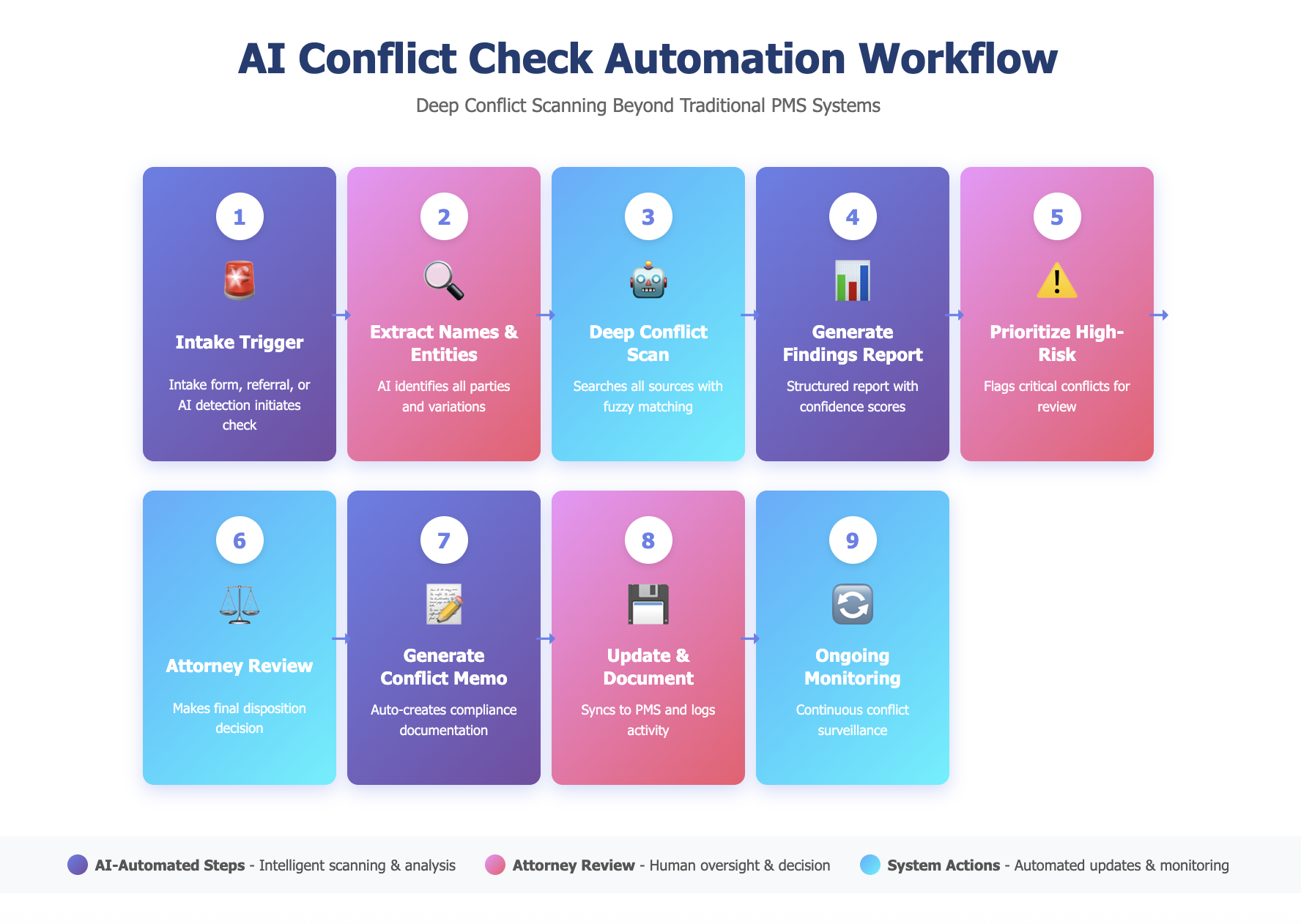
1. Intake Trigger
A conflict check begins when ANY of the following occur:
- A new lead submits an intake form
- A referral partner sends a potential client
- The firm manually initiates a check
- A paralegal flags a possible adverse party during intake
- AI detects a similar name during document ingestion
2. AI Extracts All Relevant Names & Entities
From the intake data, AI automatically identifies:
- Client full name + any known aliases
- Opposing party names
- Spouse names (if applicable)
- Employer names
- Corporations/entities involved
- Insurance carriers
- Other relevant individuals
- Related parties mentioned in communications
AI also generates variations:
- Nicknames and shortened versions
- Alternative spellings
- Common misspellings
- Married/maiden names
This already outperforms standard PMS conflict checks.
3. AI Performs a Deep Conflict Scan
Unlike your PMS, which only searches exact name matches in your client database, AI searches:
Names & Variations
- All name variations across every data source
- Fuzzy matching (catches “Jon Smith” vs “John Smith”)
- Semantic matching (understands context, not just keywords)
Relationships
- Spouses, domestic partners, family members
- Employers and supervisors
- Parent/subsidiary corporate structures
- Joint ventures and affiliates
- Insurance carriers and reinsurers
- Board members and officers
- Witnesses and expert witnesses
- Repeat co-parties
Documents & Communications
- Emails (with permission settings)
- Contracts and engagement letters
- Court filings and pleadings
- Exhibits and evidence
- Invoices and billing records
- Meeting notes and memos
- Documents in Dropbox/OneDrive/Google Drive
Issue-Based Conflicts
- The firm representing another client on the same legal issue
- The firm taking inconsistent legal positions in past matters
- The firm drafting documents now at issue in the case
- Work that could be materially adverse to current clients
- Policy language the firm previously wrote
Each potential match gets a confidence score and shows you exactly where it was found.
4. AI Generates a Conflict Findings Report
The system produces a structured report with:
Exact Matches (99-100% confidence)
- Direct name matches in client database
- Confirmed prior representation
- Clear adversarial history
High-Probability Matches (85-98% confidence)
- Fuzzy name matches requiring verification
- Corporate relationship connections
- Document-based discoveries
- Email correspondence indicators
Relationship-Based Flags
- Family/business connections
- Corporate affiliates
- Shared representatives or insurers
Issue Conflict Flags
- Similar matters with inconsistent positions
- Documents drafted by firm now at issue
- Overlapping subject matter
Each result includes:
- Source (database, document, email, etc.)
- Match confidence score
- Extracted snippet showing the matched text
- Why it matters (direct adversity, relationship, issue conflict)
- Recommended next steps
5. AI Prioritizes High-Risk Conflicts
The system automatically flags critical conflicts requiring immediate attorney review:
- Direct adversity (representing opposing parties)
- Significant financial conflicts
- Prior representation of adverse party
- Matter significantly related to previous case
- Multiple adverse connections
- Conflicts appearing in documents not captured in PMS
These get pushed to the top of the review queue.
6. Attorney Reviews & Makes Disposition
AI prepares a clean, human-readable summary showing:
- What was found
- Why it matters legally
- Recommended disposition
The reviewing attorney makes the final call:
- “No Conflict” – Clear to proceed
- “Needs Further Review” – Additional investigation required
- “Conflict Exists” – Cannot represent
- “Consent Required” – Can proceed with informed consent/waiver
All decisions get logged in the audit trail.
7. AI Generates the Conflict Memo Automatically
The system produces a complete conflict clearance memo including:
- Full list of search terms used
- Data sources checked (database, emails, documents, etc.)
- Search methodology (semantic, fuzzy matching, relationship mapping)
- All findings with confidence scores
- Final disposition and reasoning
- Attorney reviewer name
- Date and time of review
- Consent/waiver templates (if applicable)
This satisfies both internal policy AND professional responsibility requirements.
8. System Updates & Documentation
After attorney approval, AI automatically:
- Updates conflict check status in PMS
- Attaches conflict memo to the matter
- Updates master conflict log
- Triggers next steps in intake workflow
- Creates calendar reminders (if consent needed)
- Syncs data back to Clio, MyCase, or other PMS
9. Ongoing Monitoring (Optional Advanced Feature)
AI can continuously watch for conflicts that emerge later:
- New documents that create conflicts after intake
- New parties added to the case
- Changes in opposing counsel
- New court filings involving connected parties
- Corporate changes (mergers, acquisitions, name changes)
This creates ongoing conflict monitoring, not just one-time checks.
Why This Workflow Matters
Because existing practice management software is not as thorough as a properly designed and deployed AI conflict checker.
AI enables:
- Deeper searches across all firm data, not just your client database
- More sources including emails, documents, and relationship mapping
- Faster review with confidence scores and prioritization
- Reliable flagging of high-risk conflicts
- Issue conflicts (rarely caught by traditional systems)
- Relational conflicts (almost never caught)
- Proper documentation with automated memo generation
- Continuous monitoring (impossible to do manually)
This workflow solves a real legal ethics and malpractice risk that firms immediately understand the value.